OSI Model
When sending data over a network, a series of transformations, encodings, and actions are necessary for the data to travel from one device to another. The OSI (Open Systems Interconnection) model allows this complex process to be divided into logical steps, called layers, each with a specific role.
Advantages of the OSI Model
- Facilitates the design and understanding of networks.
- Allows interoperability between different manufacturers.
- Organizes protocols and responsibilities.
Overview of the 7 Layers
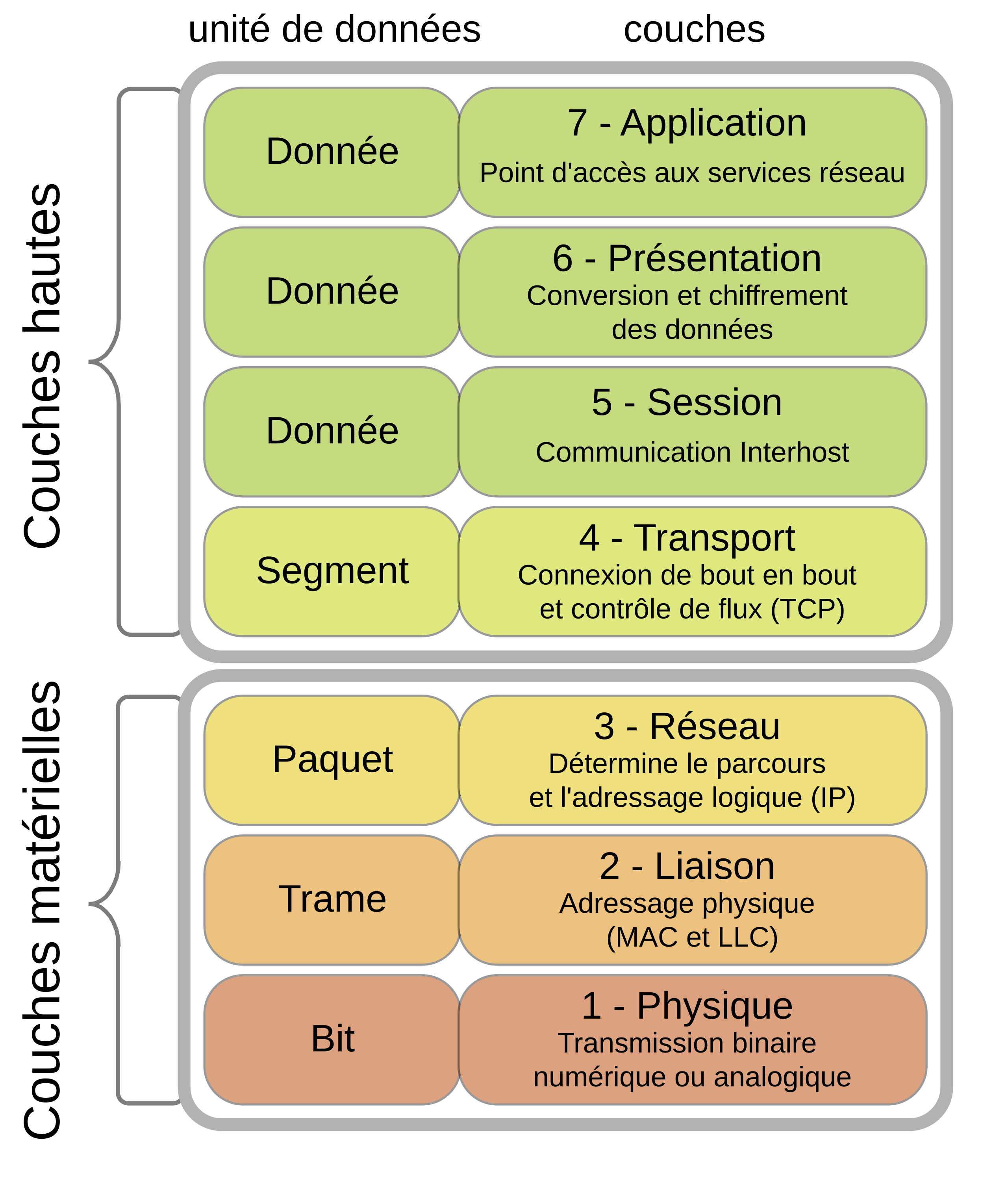
Source: Wikipedia
Layer-by-Layer Detail
Layer 1 – Physical (Physical Layer)
Role:
Transmits raw bits (0 and 1) over a physical medium: cable, optical fiber, radio waves...
Functions:
- Definition of electrical, optical, or radio signals.
- Bit synchronization.
- Connectors and cabling.
Examples:
- Ethernet cable (RJ45)
- Optical fiber
- Wi-Fi (at the modulation level)
- Bluetooth
What does a programmer see? Not much. This layer is entirely managed by hardware.
Layer 2 – Data Link (Data Link Layer)
Role:
Enables local communication between two machines connected to the same physical network.
Functions:
- Splits data into frames.
- Assignment and verification of MAC address (Media Access Control, unique for each device).
- Error detection.
Examples of protocols:
- Ethernet
- Wi-Fi (IEEE 802.11)
MAC Address:
- Unique per network card (e.g.,
00:1A:2B:3C:4D:5E) - Hardcoded in hardware
Devices:
- Switch
- Network Interface Card (NIC)
What does a programmer see? MAC address, frames, local network configuration, sometimes packet manipulation at the Ethernet level (e.g., Wireshark, Scapy).
Layer 3 – Network (Network Layer)
Role:
Ensures packet routing from one network to another (network interconnection).
Functions:
- Assignment of IP addresses (Internet Protocol).
- Routing between subnets.
- Packet fragmentation.
Examples of protocols:
- IP (Internet Protocol)
- ICMP (used by
ping) - ARP (IP ↔ MAC translation)
Devices:
- Routers
What does a programmer see? IP address, subnet, ping, communication via sockets (IP/port).
Layer 4 – Transport (Transport Layer)
Role:
Ensures reliable or unreliable data transport between two machines.
Functions:
- Segmentation and reassembly.
- Error control.
- Flow control.
Main protocols:
- TCP (Transmission Control Protocol)
- Reliable, with acknowledgment.
- E.g., HTTP, FTP, SSH
- UDP (User Datagram Protocol)
- Unreliable, fast.
- E.g., DNS, online video games, VoIP
Ports:
- Identify applications on a machine (e.g., port 80 for HTTP)
What does a programmer see? Manipulation of TCP/UDP sockets, port management, connection error handling, timeouts, retransmissions, choice between reliability (TCP) and speed (UDP).
Examples:
- In Python:
socket(AF_INET, SOCK_STREAM)(TCP) curl http://...→ uses TCP port 80
Layer 5 – Session (Session Layer)
Role:
Manages communication sessions between two machines. A session is a logical link between two applications.
Functions:
- Opening, managing, and closing sessions.
- Restoration after interruption.
Example protocols:
- NetBIOS
- RPC (Remote Procedure Call)
Remarks:
- Not very visible as such in modern applications (often combined with the transport layer).
Layer 6 – Presentation (Presentation Layer)
Role:
Ensures translation, compression, and encryption of data.
Functions:
- Format conversion (e.g., plain text ↔ binary).
- Encoding: ASCII, UTF-8, JPEG
- SSL/TLS encryption.
Concrete examples:
- HTTPS = HTTP + TLS (presentation layer)
- OpenSSL, GnuTLS
What does a programmer see? The presentation layer can be manipulated via libraries like ssl in Python.
Layer 7 – Application
Role:
Provides network services to user applications.
Protocols:
- HTTP / HTTPS
- FTP
- SMTP / IMAP / POP3
- DNS
Examples of applications:
- Web browsers
- Email clients
- FTP clients
- DNS clients
What does a programmer see? You use layer 7 every day: fetch(), requests.get(), socket, etc.
Layer Summary
| N° | Layer | Main Function | Examples of Protocols/Devices |
|---|---|---|---|
| 7 | Application | User network interface | HTTP, FTP, DNS |
| 6 | Presentation | Translation, encryption, compression | SSL/TLS, ASCII, JPEG |
| 5 | Session | Session/connection management | NetBIOS, RPC |
| 4 | Transport | Reliable transport, segmentation | TCP, UDP |
| 3 | Network | Routing and logical addressing | IP, ICMP |
| 2 | Data Link | Local communication, MAC address | Ethernet, Wi-Fi (802.11), PPP |
| 1 | Physical | Bit transmission over the medium | RJ45, Fiber, Radio signal |
Example of a Message Journey
Imagine you are sending an HTTP message to a remote server:
- Application (HTTP) → the browser prepares the request.
- Presentation (TLS) → the request is encrypted.
- Session → a secure session is opened.
- Transport (TCP) → the request is split into segments.
- Network (IP) → the segments are encapsulated in IP packets.
- Data Link (Ethernet) → the packets are framed.
- Physical (Cable) → the frames are converted into electrical signals.
The server receives in the reverse order: Physical → Data Link → Network … up to Application.
For Programmers
- The Application layer corresponds to your HTTP/HTTPS calls.
- The Transport layer (TCP/UDP) explains issues of latency, timeout, packet loss.
- The Network layer helps you understand IP addressing, client/server connection.
- The Data Link and Physical layers are useful to know for diagnosing local network issues.