VirtualBox Guest Additions
VirtualBox offers tools called "Guest Additions" that enhance the integration between the host and the virtual machine. These tools allow you to share the clipboard, resize the virtual machine window, share folders between the host and the virtual machine, etc.
Installing the Guest Additions is recommended for a better user experience. You can install it in two easy steps!
-
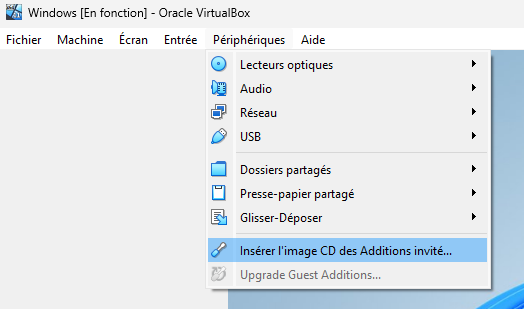
First, once your virtual machine is started, go to the "Devices" menu in VirtualBox and select "Insert Guest Additions CD image". This will mount a virtual CD in your virtual machine.
-
Then, open the file explorer in your virtual machine and access the virtual CD. You will find an executable file there. Double-click on this file to start the installation of the Guest Additions.